Implemented feature idea or fixed bug
When editing my Agendas, there is a pop up menu for tables and links. Is there a way to turn them off? Or configure them to not popup right where the curser is? Here is a video demonstrating: https://drive.google.com/file/d/1Je_KEGd7FKUlLuQBD4fJR06q6liX0MHq/view?usp=sharing
Comments (6)
Hi Flew,
Thanks for reporting this. I was able to reproduce and document the the popup behavior for tables and hyperlinks, and we are going to take a closer look at it. I look forward to getting back to you with an update as soon as I can. Let me know if you have any questions or details to add in the meantime.
Thanks!
Good news Flew!
We have made a change to address this behavior and will be included in our next release.
The release notes will be published after the release has occurred.
I am having a similar issue when I create a table. The pop ups appear as I am typing in the table and preventing me from smoothly typing words in the table. They keep popping up as I am trying to fill in the box. The pop ups are for table elements, such as creating extra rows, columns. colors. I use tables when I create example answers for essays using the assessment templates. See below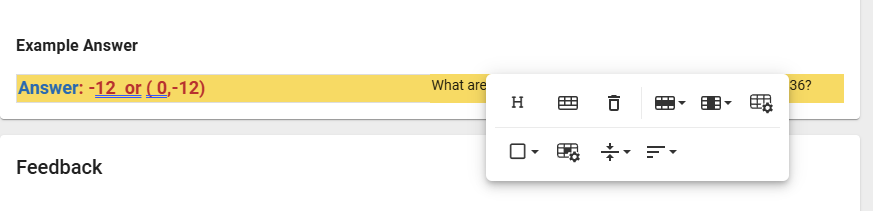
Thank you for reporting this, Barbara!
I have replicated the behavior and will need to investigate further. I'll update this discussion as soon as possible.
Thanks
Barbara Vanatta
Thank you for reporting this behavior. It will be fixed in the next release, tentatively 10/29.
Please note that you can exit the table toolbar by pressing the Esc key and this also avoids covering the typing space.