Is there a way to reduce the number of questions for a single student in a course without creating a group or reducing the questions for all students in the course?
It is possible to create an individualized activity that is graded within the "For Me" page. However, this would not have any impact on the other activities the student experiences from the course syllabus.
The best option if you need a customized activity that only a specific student would use is going to be through the use of groups or activities created through the teacher's "Clipboard".
Please let me know if you have any other questions about this!
Yes, allow me to provide some additional information!
If the intention is to create activities through the clipboard, then it will require doing it for each activity in the course. Those activities are individual for the student assigned to it.
The following article contains links to all the different features of the Clipboard and can be used to gather information: How do I use the Clipboard?
Additionally, if going down the route of using the clipboard, then a possible option would be to create an activity in the Course Editor that's hidden from students, and then link or copy it to individual students via the clipboard. That would prevent having to create the activity multiple times.
Is there a tool that can handle this without all the extra steps? For example, is there a feature in the course where you can simply select specific requirements for individual students? For instance, setting John to receive 25% fewer questions. If not, can that be developed? I feel like this is SUPER important for schools all over the place.
BTW, the clipboard does not allow this to work. I got to the part where you assign the activity in the clipboard. I was able to select the correct student. Under Activity, it only lets you add a document, YouTube video, etc. There is also a search library option. When I searched for it, the class wasn't there.
I'm so sorry, Angela. I agree that there should be a straightforward option. I will take this feedback to use for an enhancement request so that we may add this option to limit the number of questions for 1 student, as we do not have a solution that will meet these needs exactly at this time.
Currently, the best option I can recommend would be to create a Group and edit the activities for the student.
Another, but less practical option than the former, would be to place the student in their own course.
Either method will require altering the activities to meet the specific requirements for a single student.
Additionally, I'm including the authorized support contact in case you would like to communicate with a representative who is familiar with the product as it is used for this organization and the unique challenges you are encountering.
Again, I apologize on behalf of the available options not meeting this need. Please know that I will do my best to answer any additional questions you have for me.
Comments (10)
Good morning, Angela!
It is possible to create an individualized activity that is graded within the "For Me" page. However, this would not have any impact on the other activities the student experiences from the course syllabus.
The best option if you need a customized activity that only a specific student would use is going to be through the use of groups or activities created through the teacher's "Clipboard".
Please let me know if you have any other questions about this!
So would we have to do that for every activity? Is there a way to do this on a course level without affecting others.
Would you happen to have instructions on how to use groups or the clipboard to do this?
Yes, allow me to provide some additional information!
If the intention is to create activities through the clipboard, then it will require doing it for each activity in the course. Those activities are individual for the student assigned to it.
The following article contains links to all the different features of the Clipboard and can be used to gather information: How do I use the Clipboard?
One of those linked articles is specifically for creating activities through the clipboard, so I will link that here as well: How do I assign activities using the Clipboard?
Additionally, if going down the route of using the clipboard, then a possible option would be to create an activity in the Course Editor that's hidden from students, and then link or copy it to individual students via the clipboard. That would prevent having to create the activity multiple times.
We don't see the clipboard in our version of Buzz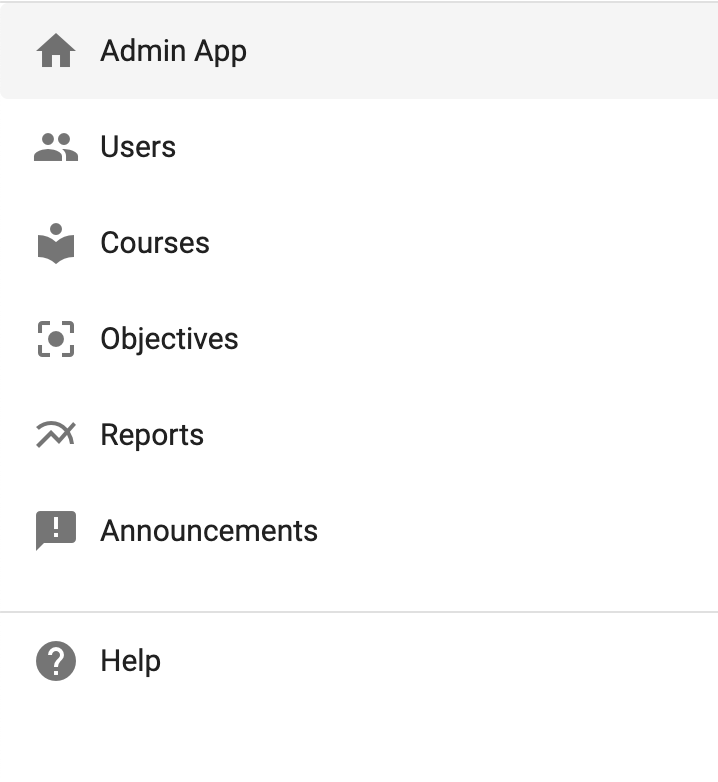

Thank you for letting me know! The provided screenshot is in the Admin app. The Clipboard is only available in the "Teacher App".
Is there a tool that can handle this without all the extra steps? For example, is there a feature in the course where you can simply select specific requirements for individual students? For instance, setting John to receive 25% fewer questions. If not, can that be developed? I feel like this is SUPER important for schools all over the place.
BTW, the clipboard does not allow this to work. I got to the part where you assign the activity in the clipboard. I was able to select the correct student. Under Activity, it only lets you add a document, YouTube video, etc. There is also a search library option. When I searched for it, the class wasn't there.
Trevor Williams, I am hoping you have another answer, because this isn't working and is causing some issues.
I'm so sorry, Angela. I agree that there should be a straightforward option. I will take this feedback to use for an enhancement request so that we may add this option to limit the number of questions for 1 student, as we do not have a solution that will meet these needs exactly at this time.
Currently, the best option I can recommend would be to create a Group and edit the activities for the student.
Another, but less practical option than the former, would be to place the student in their own course.
Either method will require altering the activities to meet the specific requirements for a single student.
Additionally, I'm including the authorized support contact in case you would like to communicate with a representative who is familiar with the product as it is used for this organization and the unique challenges you are encountering.
Again, I apologize on behalf of the available options not meeting this need. Please know that I will do my best to answer any additional questions you have for me.