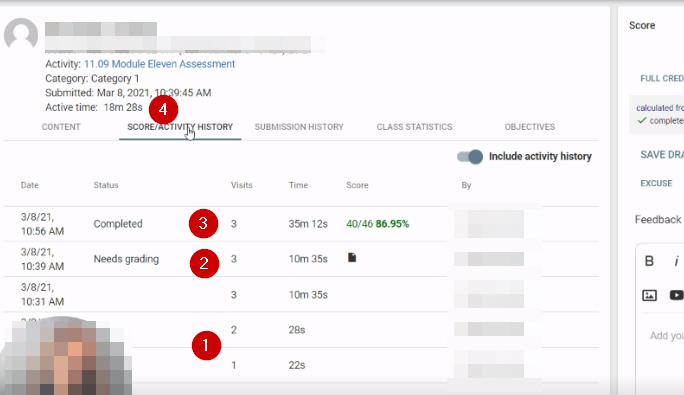
Hello! Can someone help me better understand these 4 different activity times shown below? We are trying to support a teacher team.
1) 22s and 28s - likely the student just opened the assessment but hadn't started it? Then they navigated away?
2) 10m 35s - "Needs grading" - After 10.5 minutes, the student submitted the activity
3) 35m 12s - "Completed" - Was this the total amount of time it took them including switching to other tabs or something?
4) 18m 28s - "Active Time" - Is this is the actual amount of time the student had the assessment open and they were looking at it - thus "active"? But if that's true, then what is the 10.5 minutes? How did this number get calculated when nothing else I see on this data screen adds up to 18.5 minutes?
Additional information - the "By" fields were all the student. https://drive.google.com/file/d/1qwb5AU4qE7GUK8qbH3C0Fo0uZ0ZK4fuz/view?usp=sharing
Comments (1)
Hello Meri:
Active time is the total time the student spent after they have started an exam up to submission. It doesn't account for when they are viewing exam before starting it.
The time column is the accumulated time of when a student spent viewing the activity, not necessarily when they have started it.
Each visit represents an associated amount of time with the visit.
1. They could have visited the exam but not started it.
2. That is correct. There appears to be a needs grading state at that point.
3. It could be bloated due to being in other tabs.
4. Relates to what was said above regarding active time.
Without looking at this specific example within Buzz it is difficult to say for certain what actions triggered those specific individual time stamps.