Hello! We recently noticed that in one of our World Language courses, the audio player now displays a tooltip with a "title" or display name that pulls directly from the file name. This is an issue because in a vocabulary quiz, for example, the file name is often the answer. See image below, an example in which the audio file is in the target world language and the response students must select is in English (and so is the file name).
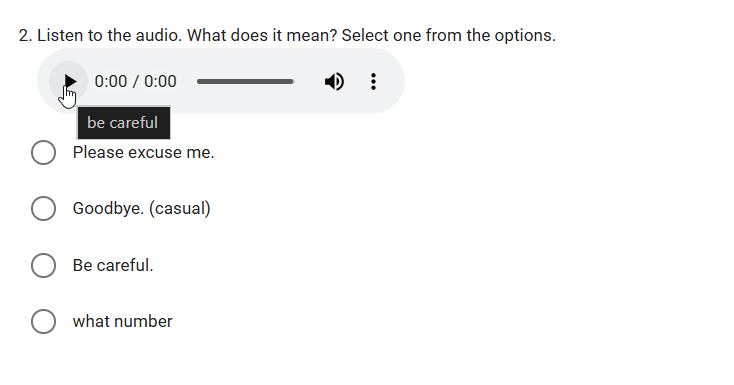
I have found a temporary workaround to edit our course quizzes to change that display name (because changing an audio file name in Buzz is not possible as far as I can tell in the Resource area). However, I am wondering:
1) Is this related to the October 30 accessibility improvement release?
2) Is there a way to turn this tooltip functionality off for assessments? Or do I just manually have to update the HTML of the embedded audio file in every instance?
3) Can the Agilix team please, please, please consider improving the usability and functionality of the Resources area in the course Editor? It is not user friendly at all.
Thank you!
Comments (8)
Good afternoon, Meri!
May I please be provided with reproduction steps that will allow me to find the question where this behavior is occurring in Buzz and experience the behavior?
Thank you!
Hi Trevor,
You can use Course ID: 229107825 which is the master version of the course the learner reported, which I am actively working on editing:
I have looked in an older version of this course (ID: 209957509) and see the same issue there but with a shorter file path for all the files being stored in the Resources area. The tooltips also appear in assessments in other courses (example is Course ID: 176425241 > 1.1 Ein Quiz) but in those cases don't quite so obviously give away the answer due to a different approach in file naming.
Interestingly, I did come across one question so far in my edits that did NOT have a tooltip display. When I looked at the code, it did not include the comma and title/display name in the code; it stopped after the file name. I cannot remember where I saw this question, but it was the only one out of dozens that I have seen that was different so far. I can let you know if I find another one and leave it be.
Trevor, I hope that helps!
Hi again, Trevor - I found an example of a question that does NOT have a "title" display when you hover over the Play button for the audio control. All the other audio questions in this quiz have the tooltip/title for the Play button and I edited those, but I will leave this particular question untouched in our course. Here's how you can find it:
Thank you, Meri!
I have replicated this behavior, and I will need to investigate further. I'll update you as soon as possible!
Hello again, Meri!
This is expected behavior, but please note that we are exploring possible solutions to potentially improve this, and there is no ETA on if or when changes may occur.
The possible workaround of editing the files can be used at this time to address this.
Please let me know if you have any other questions about this!
Hi again, Trevor - I just noticed in another course that it appears like no "tooltip" text is displaying there for the audio files in assessment questions. Why would this be occurring in some courses and not others if it is expected behavior (though it seems like it has only recently appeared)? The Course ID is 176063878; I have spot-checked quizzes throughout the course and noticed this for all of them so far. (Examples: 1.1 Vocabulary Words Quiz, 2.3 Vocabulary Words Quiz, etc).
Thanks!
Good question, Meri!
The reason that the example activity included is not displaying the tooltip is that the audio file does not have a title, as seen in the "Text editor" for the question.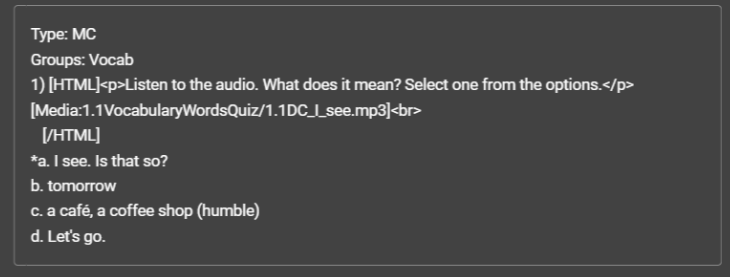
Hi Trevor! Thanks for the reminder about the code for the media files and whether they include a "title" or not. That must have just been a difference in the course authoring approach when these two courses were created and files initially uploaded. I'll have to keep that in mind for future course content being authored!
Happy Monday!