Answered
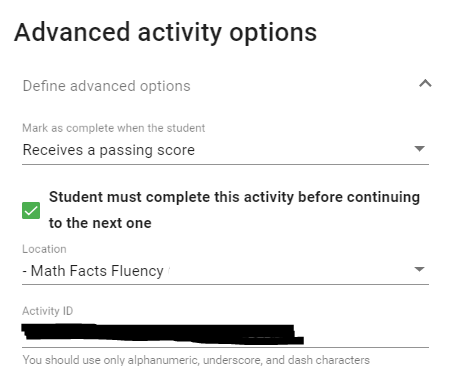
I noticed that the setting under Advanced Activity Options “Student must complete this activity before continuing to the next one” is more difficult to use than it has in the past.
I remember being able to choose the dependent activity from a dropdown menu, but now it seems to require the Activity ID. This makes it far less intuitive and difficult to check to see if it is set up correctly. Can the activity picker be a dropdown menu like the location picker above it?
Comments (3)
Hello Kevin:
The feature that a student must complete this activity before continuing to the next one prevents the student from moving to the next items within the course till they have completed that particular item.
The option that I believe you are referring to is the "Block access until student completes other activity"? This is located within the "Visibility and access" panel of the item settings. See attached screenshot. Does this address your concerns?
I do believe this addresses my concern. What is the difference between the 2 options.
With both sounding very similar, combined with the ever changing moving menus, this is very confusing.
The student must complete this activity before continuing option prevents a student from working on the next activity in the order of the syllabus till they have completed that particular activity.
The "Block access until student completes other activity" requires a student to complete one or more activities of the syllabus that the teacher defined to complete before a student can continue in the course. This gives the flexibility of requiring multiple activities throughout the course to be completed before the student may continue to the next activity.