Hello, I am trying to create a matching question that has multiple items in the same categories. I referred to two Buzz articles while trying to troubleshoot the issue I came across (links below). The issue is that the quiz is making an entirely new category with the same label, rather than combining them. Based on the description and images provided by Buzz, I should be able to have, say, 2 items in Category A, 1 item in Category B, 4 items in Category C, etc. What I am seeing, though, is that instead of letting me do 2 items in Category A, it puts one item in Category A and then creates a second Category A to put the second item in. The issue happens whether I have drag-and-drop enabled or disabled.
Here is the editor version of the question I am trying to add:
Type: MT
Options: Categorization
5) Complete the matching activity to check your understanding.
a. Item 1 = Category A
b. Item 2 = Category A
c. Item 3 = Category B
d. Item 4 = Category C
Below is what shows in the Preview of the question:
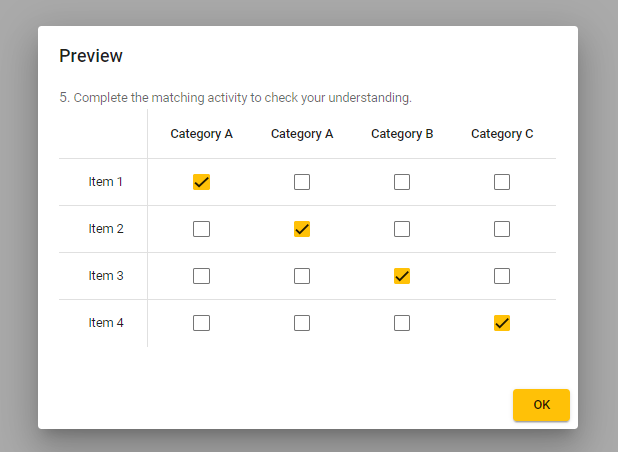
Am I missing something, or is there a bug here? Thank you!
Links I looked through:
Comments (2)
Hi there,
Thank you for providing such a detailed report of the behavior you encountered while creating your matching question. I truly appreciate your thoroughness in describing the issue!
I was able to replicate the behavior you described by copying and pasting the editor version of your question. It seems that there was a special character that looked similar to a regular character in the name of "Category A," which caused Buzz to treat them as two separate categories, even though they looked the same.
Not to worry, though! I'm glad to let you know that I've resolved this for you. By deleting the lines for the duplicate category "a. Item 1 = Category A" and "b. Item 2 = Category A," and then manually re-typing those lines with regular characters from my keyboard, the matching question now displays only one "Category A" as expected.
Here's the corrected version of your question that you can simply copy and paste:
Type: MT
Options: Categorization
5) Complete the matching activity to check your understanding.
a. Item 1 = Category A
b. Item 2 = Category A
c. Item 3 = Category B
d. Item 4 = Category C
With that corrected text you should be able to have multiple answer choices in the same categories without any issues.
Have a great day!
Thanks so much! All is working great now.